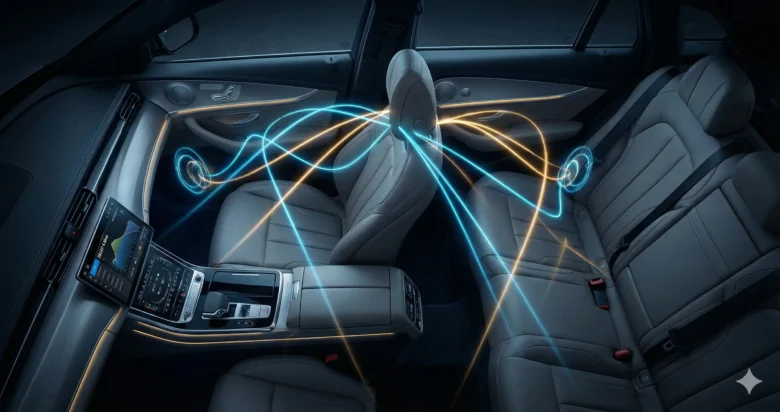
If you are an enthusiast of the “Home Theater” experience, you know that the “Sweet Spot” is everything. In your living room, you can place your couch exactly in the center of the speakers. In a car, you are stuck in the driver’s seat—shifted to the left and closer to the dashboard than the rear.
This asymmetry is an acoustic nightmare. The sound from the left tweeter hits your ear in about 2 milliseconds, while the sound from the right tweeter might take 5 milliseconds. Your brain perceives this 3ms difference as the sound being “pulled” to the left. The magic of a Digital Signal Processor (DSP) is that it can artificially delay the faster speakers, ensuring that every wave of sound from every speaker hits your eardrums at the exact same microsecond.
The Physics of Sound Speed
To master time alignment, you must understand your medium. Sound travels through air at a constant speed (depending on temperature, but we use a standard average).
- Speed of Sound: Approximately 343 meters per second (or 1,125 feet per second).
- In Milliseconds: Sound travels about 34.3 centimeters (13.5 inches) in 1 millisecond.
This might seem fast, but in the world of high-end audio, 1 millisecond is an eternity. If your left and right speakers are out of alignment by just 0.5ms, the “Phantom Center” (the illusion of the singer in the middle) will vanish.
The “Reference Speaker” Concept
The golden rule of DSP delay is: You cannot speed up sound; you can only slow it down.
Because we can only add delay, we must find the speaker that is furthest from your ears. This is your Reference Speaker. Usually, this is the Subwoofer in the trunk or the Front Right speaker (in left-hand drive cars). Since the Reference Speaker takes the longest time to reach you, it will have Zero (0) Delay. We will then delay all other speakers to “wait” for the sound of the Reference Speaker to arrive.
Step 1: The Physical Measurement
Before touching the software, you need a tape measure. Sit in the driver’s seat in your natural driving position.
- Measure the distance from the tip of your nose (or center of your head) to the center of each speaker.
- Left Tweeter: e.g., 80 cm
- Right Tweeter: e.g., 130 cm
- Left Midrange: e.g., 90 cm
- Right Midrange: e.g., 140 cm
- Subwoofer: e.g., 250 cm (This is our Reference Speaker).
Pro Tip: If you have a 3-way system (Tweeter, Mid, Woofer), you must measure every single component individually. Precision is the difference between “good” and “cinematic.”
Step 2: The Math of Delay
Now we convert those distances into time. Since we want all speakers to “arrive” at the same time as the furthest one (the Subwoofer), we use the following logic:
The Formula (HTML Format)
To calculate the delay for any speaker, use this formula:
<div style=”background-color: #f4f4f4; padding: 15px; border-left: 5px solid #333; margin: 20px 0;”> <b>Delay (ms) = (Distance of Furthest Speaker – Distance of Target Speaker) / 34.3</b> </div>
Where distance is in centimeters.
Let’s calculate the Left Tweeter from our example:
- Furthest Speaker (Sub): 250 cm
- Left Tweeter: 80 cm
- Calculation: (250 – 80) / 34.3
- 170 / 34.3 = 4.95 ms
Now for the Right Tweeter:
- (250 – 130) / 34.3
- 120 / 34.3 = 3.49 ms
You will input these numbers (4.95 and 3.49) into your DSP software. Now, the left tweeter will “wait” longer than the right tweeter, and both will wait for the subwoofer’s sound to travel from the trunk.
Step 3: Subwoofer Integration (The “Up-Front” Bass)
The biggest complaint in car audio is: “I can hear my bass coming from the trunk.” This happens because the subwoofer’s sound arrives later than the front speakers.
By setting the Subwoofer as the 0ms reference and delaying the front stage, you are effectively “pulling” the bass forward. When timed perfectly, the bass waves and the mid-bass waves from your doors will hit your back at the same time they hit your ears. This creates the illusion that the bass is coming from the dashboard. This is the hallmark of a “Cinema” experience in a car.
Step 4: Phase vs. Delay
Sometimes, even with perfect math, the sound feels “thin.” This is usually a Phase issue.
- Delay moves the speaker in time.
- Phase (Polarity) flips the wave upside down.
If your left and right speakers are perfectly timed but out of phase, they will cancel each other out, and your bass will disappear. Most DSPs have a “Phase 0/180” button. After setting your delay, try flipping the phase on one speaker. If the bass gets stronger, leave it. If it gets weaker, flip it back.
Step 5: Fine-Tuning by Ear (The Vocals Test)
Math gets you 90% of the way there, but your car’s interior (glass, plastic, fabric) reflects sound and can mess with the timing.
- Play a track with a strong, dry vocal (like “Spanish Harlem” by Rebecca Pidgeon or a high-quality acoustic track).
- Close your eyes. The voice should sound like a small, tight ball of sound right above your steering wheel or in the center of the dash.
- If the voice is too far to the left, increase the delay on the Left Tweeter in small steps (0.02ms increments).
- If the voice sounds “blurry” or wide, your tweeters and midranges might not be aligned with each other.
The 2026 Perspective: AI and Auto-EQ
In 2026, many DSPs now come with integrated measurement microphones and AI algorithms. Tools like Dirac Live or high-end processors from Mosconi and Brax can now perform an “Impulse Response” test. They send a “click” through each speaker and the microphone calculates the delay automatically.
However, even with AI, a professional installer always verifies the results manually. No microphone can perfectly replicate the way a human brain perceives space and depth.
Conclusion: Your Personal IMAX
Time alignment is the “secret sauce” of high-end car audio. It turns a collection of speakers into a unified musical instrument. By delaying the speakers closest to you, you overcome the physical limitations of the car’s cabin and create a soundstage that is wide, deep, and perfectly centered.
It takes patience and a lot of listening, but once you hear that “Center Image” snap into place for the first time, you will never be able to listen to a non-DSP system again. Your car has officially become a theater.
FAQs
1. Can I do time alignment without a DSP? Some high-end head units (like Pioneer NEX or Alpine Halo) have built-in “Time Correction.” While not as precise as a standalone DSP, they use the same distance-based logic and can significantly improve your soundstage.
2. Should I align to my head or to the center of the car? If you are the primary driver, always align to the Driver’s Seat. This creates the perfect “Sweet Spot” for you. If you want a “Theater for Everyone,” you will have to compromise and align to the center of the car, which won’t be perfect for anyone but will sound “okay” for all passengers.
3. Does Time Alignment affect my crossovers? Yes. When speakers are out of time, their frequencies can cancel out at the crossover point (e.g., where the tweeter meets the midrange). Aligning them ensures a smooth transition and better frequency response.
4. What happens if I move my seat? Unfortunately, Time Alignment is position-dependent. If you move your seat back two inches, your timing will be slightly off. Most DSPs allow you to save “Presets” (e.g., Preset 1 for your driving position, Preset 2 for when you have the seat back).
5. Why does my DSP measure in Milliseconds (ms) instead of Centimeters (cm)? Centimeters are a measurement of distance, but the DSP is an electronic device that works in time. Most modern software allows you to toggle between them, but doing the math in milliseconds is the most accurate way to understand the speed of your signal.