I’ll never forget a guy named Greg who came into my shop on a Saturday afternoon, holding two Morel silk dome tweeters like they were wounded birds. He was devastated. He’d just spent $500 on the set and installed them in an active setup. He told me he was tuning his new DSP, felt the sound was “a bit thin,” and lowered the crossover frequency to 1,500Hz to bring the vocals up.
Three seconds into the first song, he heard a “pop” followed by total silence. By the time he smelled the burnt voice coil, it was too late. Greg had made the classic mistake: he treated a high-frequency driver like a mid-range. He didn’t understand that a tweeter’s voice coil is about as thick as a human hair.
That “Silent Saturday” cost Greg $500 and a lot of pride. Today, I’m going to show you how to make sure that never happens to you. In the pro world, we don’t guess—we calculate.
Thermal vs. Mechanical Failure: How They Die
Before we talk about settings, you need to understand the two ways a tweeter dies.
- Thermal Failure: This is caused by too much wattage or a clipped signal. The voice coil gets so hot that the adhesive holding the wire melts, or the wire itself burns through.
- Mechanical Failure: This happens when you play a frequency that is too low. Low frequencies require the diaphragm to move a long distance (Excursion). A tweeter is only designed to move a fraction of a millimeter. If you force it to move too far, the spider or the surround tears, or the coil hits the backplate.
The High-Pass Filter (HPF): Your First Line of Defense
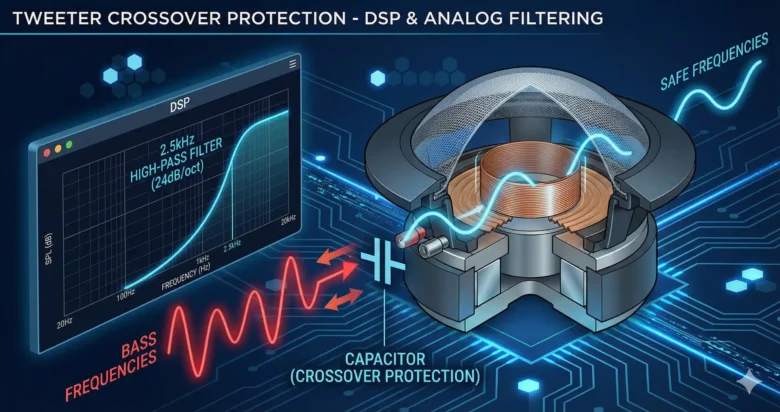
In car audio, a High-Pass Filter (HPF) is a gatekeeper. It allows high frequencies to pass through to the tweeter while blocking the low frequencies that would destroy it.
If you are running an active system (where each speaker has its own amp channel), setting the HPF correctly in your head unit or DSP is non-negotiable. If you get this wrong, the tweeter dies instantly.
The 2x Fs Rule: The Mathematical Anchor
Every tweeter has a specification called Fs (Resonant Frequency). This is the frequency where the driver naturally wants to vibrate. You can find this on the manufacturer’s spec sheet.
The Golden Rule: Never, under any circumstances, set your crossover lower than twice the Fs.
Safe_HPF = Fs * 2
Example:
If Tweeter Fs = 1,200Hz
Safe_HPF = 2,400Hz
Why twice? Because near the resonant frequency, the tweeter’s impedance changes wildly, and its excursion increases dramatically. By crossing over an octave above Fs, you ensure the driver stays in its linear “safe zone.”
Understanding Slopes: The “Cliff” vs. The “Slide”
Setting the frequency is only half the battle. You also have to decide how “steep” the filter is. This is measured in decibels per octave (dB/Octave).
6dB/Octave (1st Order)
This is a very shallow slope. If you set your HPF at 3,000Hz with a 6dB slope, the tweeter is still receiving a significant amount of power at 1,500Hz. This is very dangerous for high-power systems. Most “Old School” guys avoid this unless they are using very low-power setups.
12dB/Octave (2nd Order)
The industry standard for most passive crossovers. It provides a decent balance but still allows some overlapping energy.
24dB/Octave (4th Order)
In a professional DSP-tuned system, this is my go-to. A 24dB slope (Linkwitz-Riley) acts like a brick wall. It cuts the low frequencies so sharply that the tweeter is almost completely protected from excursion-related stress.
At 1 Octave below crossover frequency:
– 6dB slope: 25% power remaining
– 12dB slope: 6.25% power remaining
– 24dB slope: 0.39% power remaining
Looking at that math, you can see why a 24dB slope is much safer for a high-end tweeter like Greg’s.
The Capacitor Safeguard: Why Even Active Systems Need a “Safety Net”
Even if you have the world’s most expensive DSP, accidents happen. A software glitch, a dead battery reset, or a child turning a knob can reset your DSP to “Full Range.” If that happens while your volume is up, your tweeters are gone in a heartbeat.
That’s why I always install a Protection Capacitor (or “Bass Blocker”) in series with the positive wire of the tweeter, even in active systems.
How it works: You choose a capacitor that has a 6dB cutoff point one octave below your digital crossover. If your DSP fails and sends a 50Hz signal to your tweeter, the capacitor will block it. It’s a $2 piece of insurance for a $500 tweeter.
The Clipping Connection: The Silent Killer
You can have the perfect crossover settings and still burn a tweeter if your amplifier is clipping.
When an amp clips, it stops producing a smooth sine wave and starts producing a “square wave.” Square waves are pure evil for tweeters. They contain massive amounts of high-frequency harmonic energy and, more importantly, they keep the voice coil in a “fixed” position for a split second, which prevents it from cooling itself through movement.
If your “Clip” light is blinking on your amp, your tweeters are essentially being fed DC voltage. They will melt, regardless of your crossover settings.
Digital Signal Processing (DSP): Precision Tuning
If you want the best soundstage, you have to use a DSP. It allows you to:
- Time Align: Ensure the sound from the left tweeter hits your ear at the same time as the right.
- Level Match: High-frequency drivers are often more efficient than woofers. You usually need to turn the tweeter level down by 3dB to 6dB in the DSP to prevent them from being “harsh.”
- Phase Correction: Sometimes, flipping the phase of one tweeter by 180 degrees can magically bring the soundstage from the floor to the top of the dash.
Final Tuning Checklist
When I’m in the shop and about to fire up a new system, I follow this exact protocol:
- Volume at ZERO: Never turn on a system for the first time with the volume up.
- Check the Spec Sheet: Find the Fs. If it’s 1,000Hz, set your HPF to 2,500Hz just to be safe.
- Set the Slope: Start with 24dB/Octave Linkwitz-Riley.
- Listen at Low Volume: Play a vocal track. If the tweeter sounds “scratchy” or “stressed,” raise the crossover frequency immediately.
- Check for Heat: After 15 minutes of hard playing, feel the back of the tweeter if possible. If it’s hot to the touch, your crossover is too low or your amp is clipping.
Conclusion
Greg’s Morel tweeters didn’t have to die. If he had followed the 2x Fs rule and used a steeper slope, they would still be singing today.
Remember, the tweeter is the most delicate part of your audio system. It’s responsible for the “air,” the “detail,” and the “excitement” of the music, but it can’t handle the heavy lifting. Treat it with respect, use the math, and always install a backup capacitor. In car audio, an ounce of protection is worth a pound of replacement parts.
FAQs
1. Can I use a passive crossover and a DSP at the same time? Yes, but it’s redundant. If you are using a DSP, it is better to go “Fully Active” (one amp channel per speaker). This gives you total control over the slopes and time alignment. If you use a passive crossover, the DSP can only “EQ” the entire set, not the individual drivers.
2. What happens if I set the crossover TOO high? You won’t break the tweeter, but you will create a “hole” in your music. If your woofer stops at 2,000Hz and your tweeter starts at 5,000Hz, all the musical information between those frequencies will disappear. This is why choosing a tweeter with a low Fs is important for SQ builds.
3. Does the “Phase” of the tweeter affect its safety? No. Flipping the phase (swapping + and -) changes the soundstage and how the waves interact with the woofers, but it has no impact on the electrical safety of the voice coil.
4. Why do my tweeters sound better when they are “Off-Axis” (not pointing at me)? Many tweeters have a “peak” in their response when pointed directly at the listener. By aiming them at the windshield or across the dash, you use the cabin’s acoustics to naturally roll off some of the harshness.
5. How do I know if my tweeter’s voice coil is already “half-burnt”? Use a digital multimeter to check the resistance (Ohms). If the spec sheet says 4-Ohms and your meter reads 1.2-Ohms or 15-Ohms, the coil is damaged. A “scratchy” sound at low volume is also a major red flag for mechanical fatigue.